JavaScript Error in JetBrains Toolbox

Hi, I am under Ubuntu 18.04 and when I try to run the toolbox I have the following screen
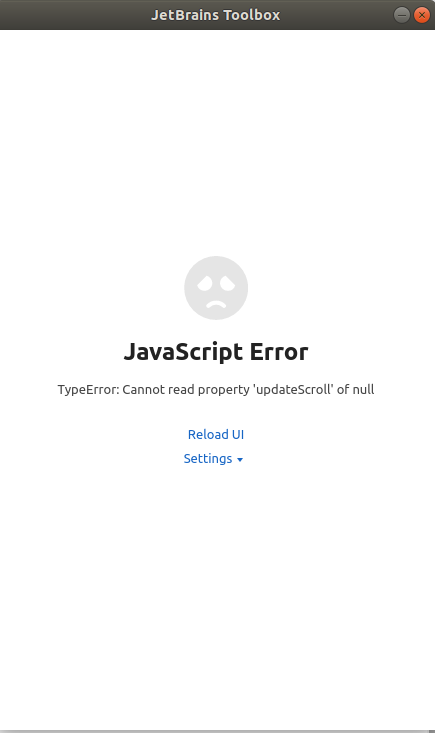
Does anyone have an idea of how to solve this problem ?
Thanks !
Please sign in to leave a comment.
I'm running into the same thing. Fresh install of 18.04. When checking the log.txt file I'm getting these lines:
1.8.3678 8340 2018-05-18T16:18:45.204 DEBUG ApplicationFeedDownl 92 Downloaded feed "https://download.jetbrains.com/toolbox/feeds/v1/public-feed.feed.xz.signed" Last-Modified "Fri, 18 May 2018 22:01:54 GMT"
1.8.3678 8340 2018-05-18T16:18:45.205 ERROR SignatureManager 193 "139961205753400:error:2E099064:CMS routines:CMS_SIGNERINFO_VERIFY_CERT:certificate verify error:cms_smime.c:287:Verify error:certificate has expired\n"
1.8.3678 8340 2018-05-18T16:18:45.205 WARN ApplicationFeedDownl 95 Unable to parse feed from "https://download.jetbrains.com/toolbox/feeds/v1/public-feed.feed.xz.signed" "Failed to verify signature: Signature verification failure"
Having the same issue here on macOS 10.13.4. I have the same screen as OP, but here's my log files:
1.8.3678 1136 2018-05-18T19:19:23.939 INFO DPI 36 onStart: Screen 1: physicalDotsPerInch 127.75 128 127.5
1.8.3678 1136 2018-05-18T19:19:23.939 ERROR SignatureManager 193 "123145483628616:error:2E099064:CMS routines:CMS_SIGNERINFO_VERIFY_CERT:certificate verify error:cms_smime.c:287:Verify error:certificate has expired\n"
1.8.3678 1136 2018-05-18T19:19:23.939 INFO DPI 37 onStart: Screen 1: depth 24
1.8.3678 1136 2018-05-18T19:19:23.939 ERROR RemoteApplications 51 Unable to parse built-in feed "Failed to verify signature: Signature verification failure"
I checked on a different machine with ubuntu 16.04 and it produced the same "certificate has expired" result. Maybe this is being caused server side.
Same issue in Windows 10. Worked fine until today, and was getting can't connect to server error. Reinstalled, and now I get the same error message as you.
I'm getting it in Arch too! I thought it was only me. It worked perfectly yesterday.
It says "Can't connect to server" in Mac OS.
Yep, I have the exact same problem. I have installed a fresh 18.04 64bit then installed build-essential and Qt 5.10.
I think this is a server/client issue...not a BUG...but we have to see...
Here is part of my log file:
1.8.3678 3275 2018-05-19T08:45:17.689 DEBUG DetectedApplications 61 Checking "/home/saeid/.local/share/JetBrains/Toolbox/build.txt"
1.8.3678 3275 2018-05-19T08:45:17.689 DEBUG LocalApplications 122 Local feed wasn't changed after update
1.8.3678 3275 2018-05-19T08:45:17.692 ERROR index.js 5 TypeError: Cannot read property 'updateScroll' of null
1.8.3678 3275 2018-05-19T08:45:17.692 ERROR index.js 1 Fatal error: qrc:/index.js:5:113685 Uncaught TypeError: Cannot read property 'updateScroll' of null
1.8.3678 3275 2018-05-19T08:45:17.698 ERROR index.js 5 Uncaught TypeError: Cannot read property 'updateScroll' of null
1.8.3678 3275 2018-05-19T08:45:17.798 ERROR index.js 1 qrc:/index.js:5:113685 Uncaught TypeError: Cannot read property 'updateScroll' of null.
componentDidUpdate()@webpack:///src/components/tool-list/tool-list.js:45:3
commitLifeCycles()@webpack:///node_modules/react-dom/cjs/react-dom.production.min.js:169:264
Id=!1}u=u.nextEffect}}catch(Jd){f=!0,g=Jd}f&&(null===u?w()@webpack:///node_modules/react-dom/cjs/react-dom.production.min.js:180:195
g()@webpack:///node_modules/react-dom/cjs/react-dom.production.min.js:183:347
p()@webpack:///node_modules/react-dom/cjs/react-dom.production.min.js:184:366
0;null!==a&&c;){c=!1;if(a.pendingWorkPriority===T||a.pendingWorkPriority>b)c=!0,a.pendingWorkPriority=b;null!==a.alternate&&(a.alternate.pendingWorkPriority===T||a.alternate.pendingWorkPriority>b)&&(c=!0,a.alternate.pendingWorkPriority=b);if(null===a["return"])if()@webpack:///node_modules/react-dom/cjs/react-dom.production.min.js:188:389
S()@webpack:///node_modules/react-dom/cjs/react-dom.production.min.js:187:415
enqueueSetState()@webpack:///node_modules/react-dom/cjs/react-dom.production.min.js:140:181
isMounted()@webpack:///node_modules/react/cjs/react.production.min.js:12:343
this.selector.run()@webpack:///node_modules/react-redux/es/components/connectAdvanced.js:207:0
Looks like it's fixed now. Haven't checked on windows or any linux distro though. Can anyone else confirm?
Confirmed working again on ubuntu 16.04/18.04
Works fine on ubuntu 18.04 for me too