Unable to run new version of Toolbox app on machines with AMD video cards and x2 monitors

Hi Folks:
I'm currently running Toolbox version 1.1.2143 on a couple of my computers that have dual monitors and amd video cards without any issues.
Last spring a newer version (1.2.2314 and every version since) came out and it will not run on either computer. Toolbox seems to run fine though on computers with dual monitors and nvidia cards. While it will run in the taskbar, when clicked on nothing happens ( no errors, nothing opens).
I just tried the latest version ( 1.5.2871 with a slightly different result: an error box of some kind opens but with no text.
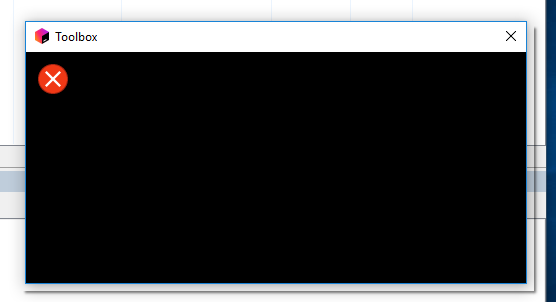
Both computers are running Windows 10. I've tried each new update to Toolbox for the last 8 or 9 months on my two AMD video card machines (Both have intel processors, one a xeon, one an i7, but the video cards are AMD.).
Any help would be appreciated (I get tired of having to re-install the old Toolbox file version from last February that still works).
Matthew
Please sign in to leave a comment.
Hi Matthew,
Please check out the latest Toolbox version. The issue should be fixed there.
Hi Artem:
The latest version fixed the issue on one of the two computers.
The other still shows the same "Error" message as shown above.
If it is helpful, the stats on the machine that is not working are:
1. Dell Precision T1600 with 16 GB of Ram.
2. Video Card: ATI FirePro V4800 (FireGL V)
Driver Info: Driver Provider: Advanced Micro Devices, Inc.
Driver Date: 1/30/2017
Driver Version: 15.201.2401.1010
(The version above is the latest available on their site).
I also tried uninstalling the newest version and installed an old version of their video driver with no change in the error
Driver Date: 11/4/2015 Driver Version: 15.201.1151.1008
3. Windows 10 : Version 10.0.16299 Build 16299
If you need any other information let me know please....
Matthew
Hi Matthew,
And what is the specification for the first machine (where the issue got fixed)? Is it completely different?
Thank you.
Hi Artem:
Yes the two are completely different as far as hardware. One is a laptop (newer, works now) the other is a desktop. Both though have AMD video cards and both use dual monitors.
The computer that is working now is a:
DELL PRECISION M7710 Quad core xeon processor 3.3GHZ 32GB 2133MHZ FHD 1080P 512GB SSD Laptop
The video card is a : AMD FIREPRO W5170M 2GB Ram.
It is running the same operating system (latest version of Windows 10 Enterprise).
This uses a docking station which I connect the two monitors too
The Non-working one is a Destop (Tower chassis).
I get the same error window on my Dell XPS 9560. Here is the error log output with the exact error message:
1.6.2914 6408 2018-01-03T23:29:32.126 DEBUG Icon activated. Reason: "Trigger"
1.6.2914 6408 2018-01-03T23:29:32.135 INFO Action: Show Window @ tray icon
1.6.2914 6408 2018-01-03T23:29:32.142 INFO DPI: onBeforeMainWindowShown
1.6.2914 6408 2018-01-03T23:29:32.150 INFO ====================
1.6.2914 6408 2018-01-03T23:29:32.157 INFO DPI: Screen devicePixelRatio: 1
1.6.2914 6408 2018-01-03T23:29:32.164 INFO DPI: Screen remote desktop: false
1.6.2914 6408 2018-01-03T23:29:32.171 INFO DPI: Screen 1: physical size QSizeF(346, 194)
1.6.2914 6408 2018-01-03T23:29:32.202 INFO DPI: Screen 1: logical size QSize(1920, 1080)
1.6.2914 6408 2018-01-03T23:29:32.210 INFO DPI: Screen 1: available geometry QRect(0,0 1920x1040)
1.6.2914 6408 2018-01-03T23:29:32.218 INFO DPI: Screen 1: geometry QRect(0,0 1920x1080)
1.6.2914 6408 2018-01-03T23:29:32.225 INFO DPI: Screen 1: size QSize(1920, 1040)
1.6.2914 6408 2018-01-03T23:29:32.232 INFO DPI: Screen 1: devicePixelRatio 1
1.6.2914 6408 2018-01-03T23:29:32.238 INFO DPI: Screen 1: logicalDotsPerInch 96 96 96
1.6.2914 6408 2018-01-03T23:29:32.243 INFO DPI: Screen 1: physicalDotsPerInch 141.175 140.948 141.402
1.6.2914 6408 2018-01-03T23:29:32.248 INFO DPI: Screen 1: depth 32
1.6.2914 6408 2018-01-03T23:29:32.252 INFO DPI: Screen 1: primaryOrientation Qt::ScreenOrientation(LandscapeOrientation)
1.6.2914 6408 2018-01-03T23:29:32.257 INFO DPI: Screen 1: orientation Qt::ScreenOrientation(LandscapeOrientation)
1.6.2914 6408 2018-01-03T23:29:32.261 INFO DPI: Screen 1: nativeOrientation Qt::ScreenOrientation(PrimaryOrientation)
1.6.2914 6408 2018-01-03T23:29:32.266 INFO ====================
1.6.2914 6408 2018-01-03T23:29:33.663 INFO Browser is loading a page. Waiting...
1.6.2914 6408 2018-01-03T23:29:33.672 DEBUG Icon activated. Reason: "DoubleClick"
1.6.2914 6408 2018-01-03T23:29:33.681 INFO Action: Show Window @ tray icon
1.6.2914 6408 2018-01-03T23:29:33.689 INFO Nested show window request is ignored!
1.6.2914 6408 2018-01-03T23:29:33.698 DEBUG Icon activated. Reason: "Trigger"
1.6.2914 6408 2018-01-03T23:29:33.707 INFO Action: Show Window @ tray icon
1.6.2914 6408 2018-01-03T23:29:33.718 INFO Nested show window request is ignored!
1.6.2914 6408 2018-01-03T23:29:33.726 DEBUG Icon activated. Reason: "DoubleClick"
1.6.2914 6408 2018-01-03T23:29:33.736 INFO Action: Show Window @ tray icon
1.6.2914 6408 2018-01-03T23:29:33.747 INFO Nested show window request is ignored!
1.6.2914 6408 2018-01-03T23:29:33.777 INFO Browser is loading a page. Waiting...
1.6.2914 6408 2018-01-03T23:29:33.829 INFO Browser is loading a page. Waiting...
1.6.2914 6408 2018-01-03T23:29:33.877 INFO Browser is loading a page. Waiting...
1.6.2914 6408 2018-01-03T23:29:33.894 INFO Loading started
1.6.2914 6408 2018-01-03T23:29:33.923 INFO Browser is loading a page. Waiting...
1.6.2914 6408 2018-01-03T23:29:33.974 INFO Browser is loading a page. Waiting...
1.6.2914 6408 2018-01-03T23:29:34.024 INFO Browser is loading a page. Waiting...
1.6.2914 6408 2018-01-03T23:29:34.071 INFO Browser is loading a page. Waiting...
1.6.2914 6408 2018-01-03T23:29:34.117 INFO Browser is loading a page. Waiting...
1.6.2914 6408 2018-01-03T23:29:34.163 INFO Browser is loading a page. Waiting...
1.6.2914 6408 2018-01-03T23:29:34.200 INFO Loading completed
1.6.2914 6408 2018-01-03T23:29:34.209 INFO ====================
1.6.2914 6408 2018-01-03T23:29:34.212 INFO showWindow2: Screen point: QPoint(1713,1079)
1.6.2914 6408 2018-01-03T23:29:34.216 INFO showWindow2: Screen devicePixelRatio: 1
1.6.2914 6408 2018-01-03T23:29:34.221 INFO showWindow2: Screen remote desktop: false
1.6.2914 6408 2018-01-03T23:29:34.232 INFO showWindow2: Screen 1: point physical size QSizeF(346, 194)
1.6.2914 6408 2018-01-03T23:29:34.239 INFO showWindow2: Screen 1: point logical size QSize(1920, 1080)
1.6.2914 6408 2018-01-03T23:29:34.247 INFO showWindow2: Screen 1: point available geometry QRect(0,0 1920x1040)
1.6.2914 6408 2018-01-03T23:29:34.255 INFO showWindow2: Screen 1: point geometry QRect(0,0 1920x1080)
1.6.2914 6408 2018-01-03T23:29:34.263 INFO showWindow2: Screen 1: point size QSize(1920, 1040)
1.6.2914 6408 2018-01-03T23:29:34.272 INFO showWindow2: Screen 1: point devicePixelRatio 1
1.6.2914 6408 2018-01-03T23:29:34.280 INFO showWindow2: Screen 1: point logicalDotsPerInch 96 96 96
1.6.2914 6408 2018-01-03T23:29:34.289 INFO showWindow2: Screen 1: point physicalDotsPerInch 141.175 140.948 141.402
1.6.2914 6408 2018-01-03T23:29:34.297 INFO showWindow2: Screen 1: point depth 32
1.6.2914 6408 2018-01-03T23:29:34.306 INFO showWindow2: Screen 1: point primaryOrientation Qt::ScreenOrientation(LandscapeOrientation)
1.6.2914 6408 2018-01-03T23:29:34.312 INFO showWindow2: Screen 1: point orientation Qt::ScreenOrientation(LandscapeOrientation)
1.6.2914 6408 2018-01-03T23:29:34.318 INFO showWindow2: Screen 1: point nativeOrientation Qt::ScreenOrientation(PrimaryOrientation)
1.6.2914 6408 2018-01-03T23:29:34.324 INFO ====================
1.6.2914 6408 2018-01-03T23:29:34.329 INFO showWindow2: width= 440 , height 700 , DPI 1
1.6.2914 6408 2018-01-03T23:29:34.360 ERROR ARB::createContext: wglCreateContextAttribsARB() failed (GL error code: 0x0) for format: QSurfaceFormat(version 2.0, options QFlags<QSurfaceFormat::FormatOption>(), depthBufferSize 24, redBufferSize -1, greenBufferSize -1, blueBufferSize -1, alphaBufferSize 8, stencilBufferSize 8, samples 0, swapBehavior QSurfaceFormat::SwapBehavior(DefaultSwapBehavior), swapInterval 1, profile QSurfaceFormat::OpenGLContextProfile(NoProfile)), shared context: 0x3 (The operation completed successfully.)
1.6.2914 6408 2018-01-03T23:29:34.364 ERROR GDI::createContext: wglCreateContext failed. (Cannot create a file when that file already exists.)
1.6.2914 6408 2018-01-03T23:29:34.368 WARN Unable to create a GL Context.
1.6.2914 6408 2018-01-03T23:29:34.372 WARN QQuickWidget: Failed to recreate context
Hello,
I have had the same problems with the same error logs. I am using also an AMD video card (Radeon Pro WX 5100) with two monitors and 10-bit per color plane.
I could solve the problem by moving the following dll's to another folder which is not in the PATH folders.
I move libEGL.dll, libGLESV2.dll, opengl32sw.dll from the folder C:\Users\USERNAME\AppData\Local\JetBrains\Toolbox\bin to the new folder -> C:\Users\USERNAME\AppData\Local\JetBrains\Toolbox\bin\tmp. Or delete it. After moving the files and restarting jetbrains-toolbox.exe, I get a welcome window and then a login window. I think this dll's are not fully compatible with the AMD driver's. Before I have installed the newest AMD drivers. The driver package (C:\Program Files\AMD) contains working dll's of this three files. I think this will be used now. I hope not more problems occur.
Bye
Hi Dominik:
That fixed my issue. Now I am running the latest version of Toolbox. My only question would be if I'll need to go back in and delete those files in the future when a new version of Toolbox is released. For now though this will work.
Thanks,
Matthew
I had the same issue, moving the files Dominik mentioned above fixed the problem for me.
Deleting the aforementioned DLLs solved a crash on launch issue on a fresh install of W10 Enterprise (Build 1703, updated to 1709 before installing toolbox) on an 8th Gen. Intel CPU without dedicated GPU.
Did this bug ever get fixed?
No, I'm not thinking directly. But I think that this was just a temporary problem. Probably an incompatibility between a QT version and the graphics card driver. Later, with newer drivers and a newer toolbox, I never had to move the dll's again.
I just now (Sept 9th, 2019) just purchased a new copy of Jetbrains entire suite, and I'm also getting this message about Qt5core.dll missing during the toolbox install. So I would say 'no, it has not been fixed'.
Installing Toolbox app today (24th Oct 2019) on Win10 2 monitors gave error opening Qt5Core.dll
After installation aborted the log revealed Output folder: C:\Users\Rajesh Patel\AppData\Local\JetBrains\Toolbox\bin
Extract: PACKAGE.vcxproj.filters
Can't write: C:\Users\Rajesh Patel\AppData\Local\JetBrains\Toolbox\bin\Qt5Core.dll
Interestly got same error on 1 monitor too!